> ## Documentation Index
> Fetch the complete documentation index at: https://tero-0926be64-video-walkthrough.mintlify.site/llms.txt
> Use this file to discover all available pages before exploring further.

# Datadog

> Connect Tero to Datadog for evidence, catalog context, and provider actions

export const DatadogConnectSteps = ({region, host}) => <Steps>
    <Step title="Run tero">
      <p>Open your terminal and run:</p>

      <CodeBlock language="bash">
        tero
      </CodeBlock>

      <p>This opens the Tero TUI, which guides you through setup.</p>

      <Note>
        If you don't have the CLI installed, ask your Tero contact for CLI access.
      </Note>
    </Step>

    <Step title="Log in to Tero">
      <p>The TUI opens your browser to create an account or log in. Complete the flow in your browser, then confirm the code shown in your terminal. The TUI logs you in automatically.</p>
    </Step>

    <Step title="Select Datadog">
      <p>The TUI asks which integration you want to connect. Select Datadog.</p>
    </Step>

    <Step title="Select your region">
      <p>Pick your Datadog region. Select <strong>{region}</strong>.</p>
    </Step>

    <Step title="Create an API key">
      <p>The TUI asks for an API key. Datadog uses this to authenticate requests.</p>

      <p>
        In Datadog, go to <a href={`https://${host}/organization-settings/api-keys`} target="_blank" rel="noopener noreferrer">Organization Settings → API Keys</a>. Click <strong>New Key</strong>, name it "Tero", and paste the key into the TUI.
      </p>
    </Step>

    <Step title="Create a service account">
      <p>The TUI asks for an application key. This controls what Tero can access.</p>

      <p>We recommend creating a service account instead of using your personal account. This keeps Tero's access separate and makes it easier to manage permissions.</p>

      <p>
        In Datadog, go to <a href={`https://${host}/organization-settings/service-accounts`} target="_blank" rel="noopener noreferrer">Organization Settings → Service Accounts</a>. Click <strong>New Service Account</strong> and name it "Tero".
      </p>

      <p>
        Assign a role to the service account. <strong>Standard</strong> gives Tero full functionality — it can analyze your data and take action directly in Datadog. <strong>Read-Only</strong> works too, but you'll need to take action through <a href="/edge/overview">Edge</a> or code changes instead.
      </p>

      <p>See <a href="#roles">Roles</a> for details on what each role enables.</p>

      <p>
        To create the service account from your terminal, use <a href="https://github.com/DataDog/pup" target="_blank" rel="noopener noreferrer">Datadog Pup</a>. Log in, find the role ID you want to assign, and create the service account from a JSON file.
      </p>

      <CodeBlock language="bash">
        {`brew tap datadog-labs/pack
brew install datadog-labs/pack/pup

pup auth login --site ${host.replace(/^app\./, "")}
pup users roles --output table`}
      </CodeBlock>

      <p>Create <code>tero-service-account.json</code> with the role ID for <strong>Standard</strong>, <strong>Read-Only</strong>, or your custom Tero role.</p>

      <CodeBlock language="json">
        {`{
  "data": {
    "type": "users",
    "attributes": {
      "name": "Tero",
      "email": "tero@datadoghq.com",
      "service_account": true
    },
    "relationships": {
      "roles": {
        "data": [
          {
            "id": "<ROLE_ID>",
            "type": "roles"
          }
        ]
      }
    }
  }
}`}
      </CodeBlock>

      <CodeBlock language="bash">
        {`pup users service-accounts create --file tero-service-account.json --output json`}
      </CodeBlock>
    </Step>

    <Step title="Create an application key">
      <p>After creating the service account, click on it in the list. Under <strong>Application Keys</strong>, click <strong>New Key</strong>. Copy the key and paste it into the TUI.</p>

      <p>With Pup, use the service account ID returned by the previous command. Create <code>tero-application-key.json</code>:</p>

      <CodeBlock language="json">
        {`{
  "data": {
    "type": "application_keys",
    "attributes": {
      "name": "Tero"
    }
  }
}`}
      </CodeBlock>

      <CodeBlock language="bash">
        {`pup users service-accounts app-keys create <SERVICE_ACCOUNT_ID> --file tero-application-key.json --output json`}
      </CodeBlock>

      <p>Datadog shows the application key secret once. Paste that value into the TUI.</p>
    </Step>

    <Step title="Done">
      <p>Tero validates your credentials and starts analyzing your environment. You'll see a progress bar — analysis usually takes a couple of minutes, even with billions of logs.</p>

      <p>Once it's done, you're ready to ask your first question.</p>
    </Step>
  </Steps>;

Connect Datadog when you want Tero to review log telemetry and build service and log-event context. Tero also shows cost and compliance issues, analyzes ingestion, and manages supported provider actions.

## Connect Datadog

Select your Datadog region, then follow the steps.

<Tabs>
  <Tab title="US1">
    <DatadogConnectSteps region="US1" host="app.datadoghq.com" />
  </Tab>

  <Tab title="US3">
    <DatadogConnectSteps region="US3" host="us3.datadoghq.com" />
  </Tab>

  <Tab title="US5">
    <DatadogConnectSteps region="US5" host="us5.datadoghq.com" />
  </Tab>

  <Tab title="EU">
    <DatadogConnectSteps region="EU" host="app.datadoghq.eu" />
  </Tab>

  <Tab title="AP1">
    <DatadogConnectSteps region="AP1" host="ap1.datadoghq.com" />
  </Tab>

  <Tab title="US1-FED">
    <DatadogConnectSteps region="US1-FED" host="app.ddog-gov.com" />
  </Tab>
</Tabs>

## Datadog context in Tero

Datadog gives Tero provider context for what you review in Tero:

* [Issues](/issues/overview) with evidence from log events, services, volume, cost, and compliance exposure
* [Services](/master-catalog/services) with ownership and log-volume context
* [Log events](/master-catalog/log-events) grouped from Datadog logs
* Cost and Compliance lanes tied to open issues
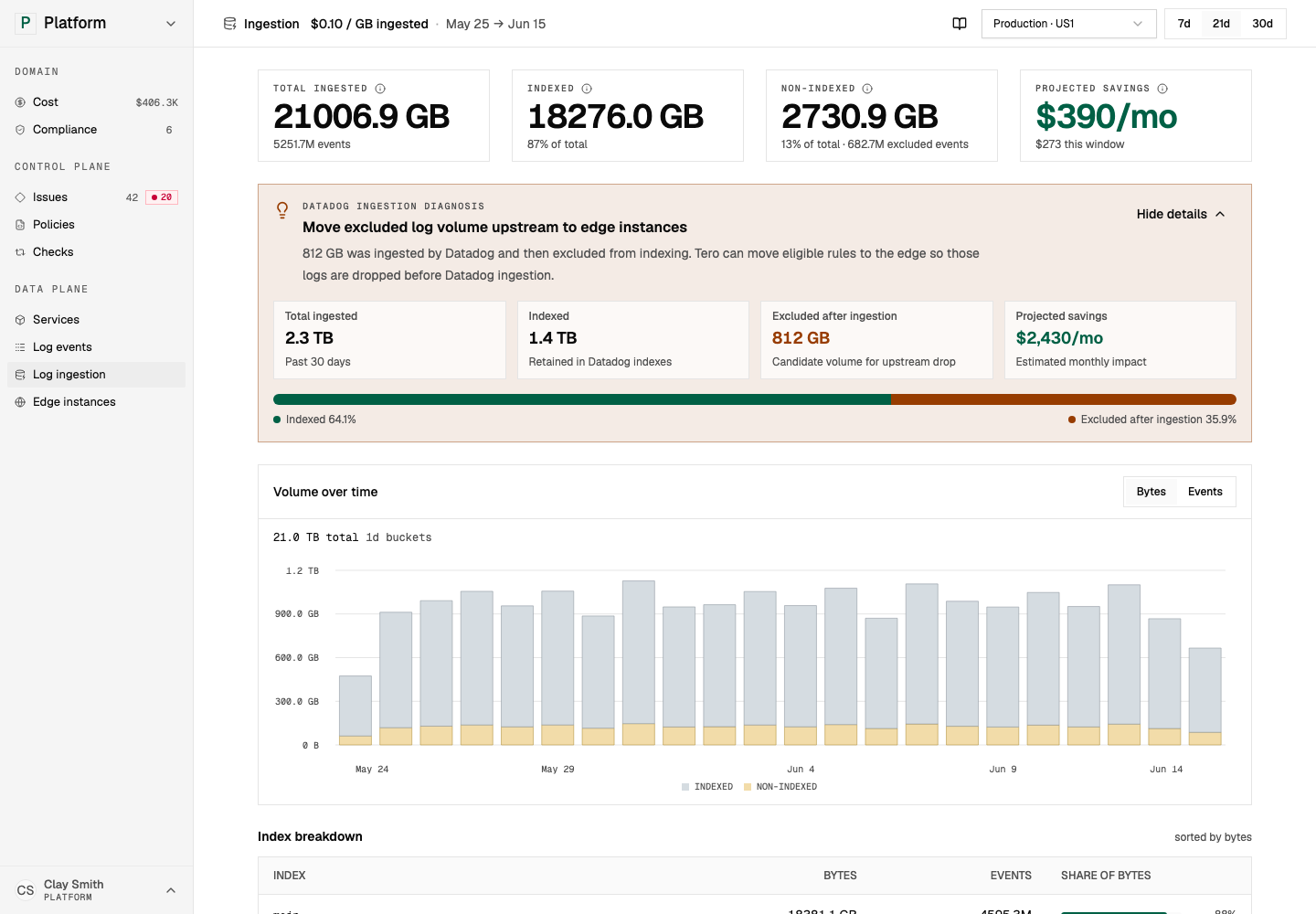
* Log ingestion analysis for indexed, non-indexed, and migration-candidate volume
* Datadog exclusion filter inventory in the [Policies](/policies) workspace

{/* screenshot-generated id: datadog-log-ingestion */}

<Frame>
  <img src="https://mintcdn.com/tero-0926be64-video-walkthrough/ZPfXdo1S3EGkRVd9/images/screenshots/integrations/datadog-log-ingestion.png?fit=max&auto=format&n=ZPfXdo1S3EGkRVd9&q=85&s=7ac821ae32f6c4bb4ddc803d74135897" alt="Datadog log ingestion analysis shows where you can move waste upstream with policies." width="1440" height="1000" data-path="images/screenshots/integrations/datadog-log-ingestion.png" />
</Frame>

<p className="screenshot-caption"><small>Datadog log ingestion analysis shows where you can move waste upstream with policies. <a className="demo-screenshot-link" href="https://demo.usetero.com/ingestion" target="_blank" rel="noopener noreferrer">Open in demo <Icon icon="arrow-up-right-from-square" /></a></small></p>

## Provider actions

With write access, Tero can manage supported Datadog log controls through the Datadog API.

Common actions include:

| Action            | What Tero can do                                                                                       |
| ----------------- | ------------------------------------------------------------------------------------------------------ |
| Exclusion filters | Convert or create filters for log events that should stop reaching indexed storage.                    |
| Pipelines         | Adjust supported log processing behavior when a policy requires provider-side handling.                |
| Policy import     | Inspect Datadog filters, preview Tero policies, and create supported policies from provider inventory. |

Provider actions are one way to run a policy. You can also run policies with [Edge](/edge/overview), deploy the [Datadog Edge distribution](/edge/distributions/datadog), or use repository workflows.

## Permissions

Datadog has managed roles and custom role permissions. Choose the narrowest role that supports the work you want Tero to do.

| Role          | What it gives Tero                                                                            |
| ------------- | --------------------------------------------------------------------------------------------- |
| **Read-Only** | Context and evidence only. You take action through Edge, your provider, or your own workflow. |
| **Standard**  | Context plus supported provider actions.                                                      |
| **Custom**    | Fine-grained access for the permissions below.                                                |

### Custom role permissions

<AccordionGroup>
  <Accordion title="Context (read)">
    | Permission             | What Tero can do                                  |
    | ---------------------- | ------------------------------------------------- |
    | `logs_read_data`       | Read log data for evidence and log-event grouping |
    | `logs_read_index_data` | Read index configuration and ingestion context    |
    | `service_catalog_read` | Read service catalog context                      |
    | `dashboards_read`      | Read dashboard usage context when available       |
    | `monitors_read`        | Read monitor context when available               |
    | `usage_read`           | Read usage data for cost and ingestion analysis   |
    | `billing_read`         | Read billing context when available               |
  </Accordion>

  <Accordion title="Provider actions (write)">
    | Permission                     | What Tero can do                   |
    | ------------------------------ | ---------------------------------- |
    | `logs_write_exclusion_filters` | Create or modify exclusion filters |
    | `logs_write_pipelines`         | Modify supported log pipelines     |
  </Accordion>
</AccordionGroup>

Start with read access when you only want evidence and recommendations. Add write permissions when you want Tero to apply provider actions.

### Scope access to services

Use Datadog restriction queries when you want Tero to read logs for specific services.

| Goal                    | Query                                      |
| ----------------------- | ------------------------------------------ |
| Single service          | `service:api`                              |
| Multiple services       | `service:api OR service:web`               |
| Service and environment | `service:api AND env:production`           |
| Exclude a service       | `service:* AND NOT service:internal-audit` |

Attach the restriction query to the role used by Tero.

## Related pages

* [Issues](/issues/overview)
* [Policies](/policies)
* [Log events](/master-catalog/log-events)
* [Edge](/edge/overview)
* [Edge Datadog](/edge/distributions/datadog)